This article explains the purpose of the Access Level Certificate, and how to authorise a computer.
To edit files offline, you need to authorise your computer by storing an Access Level Certificate, taken from a connected LiNX Access Key, to your computer. The certificate determines how you view and edit offline programs (*.lci files).
There are two supplied levels of access:
- Distributor
- Manufacturer
To edit your files with a distributor’s access level, you need to store a certificate from a distributor-level LiNX Access Key (DLX-HKEY01-A).
To edit your files with a manufacturer’s access level, you need to store a certificate from a manufacturer-level LiNX Access Key (DLX-HKEY02-A).
If you do not store your certificate from your LiNX Access Key, you will have read-only access to your stored files when offline, and will not be able to edit them.
To store the Access Level Certificate
To store the Access Level Certificate:
- Connect to a LiNX system.
- Click on the File menu.
- Click Authorise Computer.
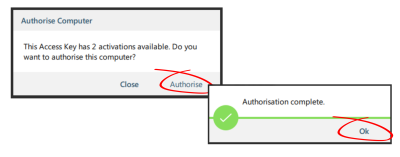
A message displays saying how many authorisations remain and asks if you want to continue. (You can only perform this operation ten times.) - Click the Authorise button to continue.
A message displays when the authorisation is complete. - Click OK to finish.