This article explains how to reset the odometer and change its units between metric and imperial.
The odometer is configured from the Odometer screen. To open this screen, Open the status and settings screen and then tap on Odometer.
There are two meters on the Odometer screen:
- total distance meter, and
- trip meter
The total distance meter shows the cumulative value of all trips. The trip meter displays the current trip value — this is the value that is displayed on the drive cards.
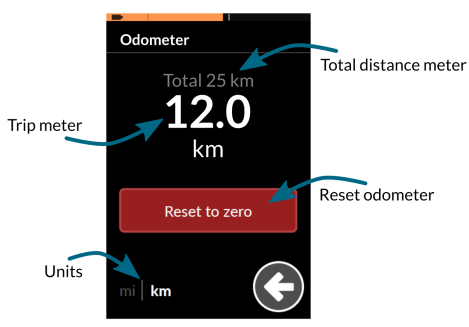
Odometer settings
Resetting the odometer
To reset the trip value, tap on the Reset to zero button.
Changing units
To change the displayed units, tap on the units selector at the bottom-left of the screen: select mi for miles, or km for kilometres.