When a wheelchair connection or file is open, the Tab bar displays. The Tab bar lets you open and quickly access a connection or files.
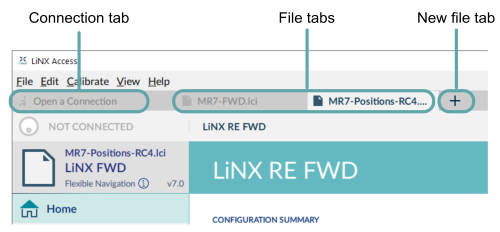
Connection tab
The connection tab is fixed to the left edge of the application and is always visible, even with no connection active.
Selecting this tab shows the current connection, or a list of available connections.
The text in the connection tab shows a connection’s LAK serial number or, if set, its friendly name. If there is no connection, the words Open a Connection display.
File tab
File tabs are to the right of the connection tab. Any number of files can be open at any one time.
Each open file has its own tab. Closing a file closes the tab. The tab text is the file name and extension. If the name is too long for the tab, an ellipsis (…) displays.
If parameters under a tab change, an asterisk (*) is appended to the tab’s text (ie. filename.lci*) until the changes are saved.
When neither a file nor connection is open, the context view displays ( Context selection window). This is a split screen view with the connection context on the left and the file context on the right.
New file tab
Click on the new file tab (+) to open a new file in a new tab.
