Skip to content
About
Close About
Open About
About Allient New Zealand
Contact
Contact
Products
Close Products
Open Products
All Medical Mobility Products
Power Wheelchairs
LiNX
LE Series
LiNX
LE Series
Mobility Scooters
Manta
r-series
Rhino2
Manta
r-series
Rhino2
Other Applications
Medical
Non-Medical
Medical
Non-Medical
Customer Portal
Support
Close Support
Open Support
All Support
Current Products
LiNX Support
MANTA Support
r-series Support
Rhino2 Support
LE Series Support
LiNX Support
MANTA Support
r-series Support
Rhino2 Support
LE Series Support
Discontinued Products
DX/DX2 Support
Shark Support
DX/DX2 Support
Shark Support
Product Service
Customer Portal
Careers
Home
>
Support
>
LiNX
>
Configure & Program
>
Work with Functions
>
How to move a function (LAPC)
Search the LiNX Knowledge Base
How to move a function (LAPC)
LiNX
Updated on August 4, 2026
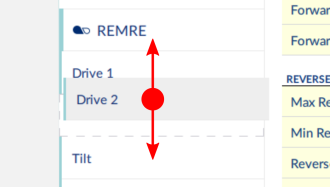
Click and hold the function you wish to move.
The function moves slightly up and to the right and a dashed box appears beneath it.
Drag the function to the required position in the profile, or to another profile.
Prev
How to move a function
How to read and edit function icons
Next