This article explains how to delete a profile using the LiNX Access iOS and PC tools.
To delete a profile
| NOTE | A profile cannot be deleted until all its component functions have been deleted. |
- Tap the red Delete button to the left of the profile name.
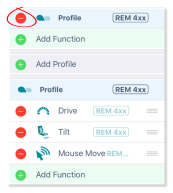
- Tap the Delete button that appears. The profile is deleted.

- Continue editing, or tap Done (top right of the screen) to return to the home screen.
- From the home screen, tap the Write button to write the program to the chair; or, on the Application menu, save your changes to a file.