- Save
- Save As
You can save a program using:
Using Save
To save the current program as a file to your iOS device.Tap the Application menu button.  Tap Save.If you have previously saved the program to a file in the current session it will automatically save to the same file (and overwrite it).If you have not previously saved the program, you will be prompted to Save as with a new file name.After saving the program, the tool displays a confirmation message with the file’s name. Tap Dismiss to remove the message and continue. Tap Save.If you have previously saved the program to a file in the current session it will automatically save to the same file (and overwrite it).If you have not previously saved the program, you will be prompted to Save as with a new file name.After saving the program, the tool displays a confirmation message with the file’s name. Tap Dismiss to remove the message and continue. | 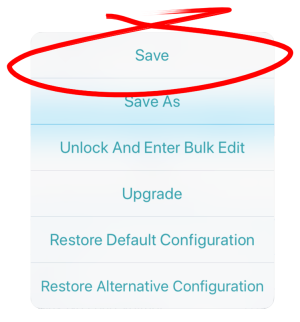 |
Using Save As
To save the current program with a different name to your iOS device:Tap the Application menu button.  Tap Save As.Enter a new file name (or use the displayed file name).Tap Save.After saving the program, the tool displays a confirmation message with the file’s name. Tap Dismiss to remove the message and continue. Tap Save As.Enter a new file name (or use the displayed file name).Tap Save.After saving the program, the tool displays a confirmation message with the file’s name. Tap Dismiss to remove the message and continue. | 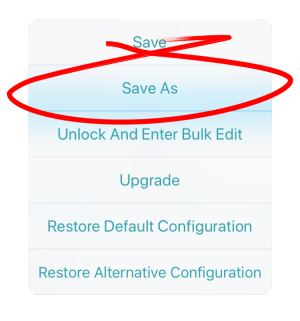 |
File extension
All configuration files are saved with a .lci extension.
- If the file has not been saved before, and if the program name is set, the save as dialog suggests saving with the program name.
- If the program name has not been set, the file can be saved with a date / time stamp: YYYYMMDD-HHMMSS.lci where:
- YYYY = year;
- MM = month;
- DD = day;
- HH = hour;
- MM = minutes;
- SS = seconds.
- If the file has been saved before, the save as dialog suggests saving with “Copy of” prepended before the name. For each subsequent save, it suggests saving with an incremental numerical value appended to the name.