An input module must be connected and Sip and Puff enabled in the module before calibrating. To enable Sip and Puff:
- From the Home screen, tap Modules.
- Tap IN 5xx.
- Tap User Input Configuration, unlock Bulk Edit, and select Sip and Puff from the User Input Configuration drop-down menu.
- Tap Write to Chair.
Open sip and puff calibration
- From the Home screen, tap Modules.
- Tap IN 5xx.
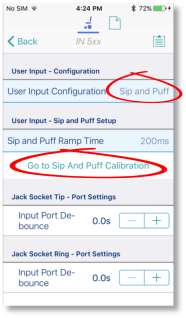
The IN5XX screen opens. - Ensure Sip and Puff is selected in User Input Configuration.
- Tap Go to Sip and Puff Calibration.
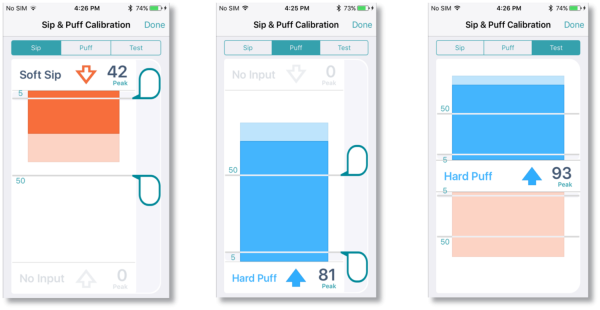
- Calibrate sip, puff and test as required.
Calibrate sip
- Tap the Sip tab.
- Use the sliders on the right of the screen to set the sip levels as required.
Calibrate puff
- Tap the Puff tab.
- Use the sliders on the right of the screen to set the puff levels as required.
Test sip and puff
- Tap the Test tab.
- Use the Test screen to test your sip and puff calibrations.
Refer to the LiNX System Installation Manual (GBK54036) for technical details on how to calibrate sip and puff.